Before you respond
Microsoft account unusual sign-in activity: what to check
A Microsoft account unusual sign-in activity email can be genuine or imitated. Check the account independently before using the email's sign-in or support route.
By Olevo · · What reviewed means
Quick answer
A Microsoft unusual sign-in alert can be genuine, but the email alone cannot verify who sent it. Open your Microsoft account independently and review recent activity. Distinguish a failed sign-in attempt from a successful sign-in you do not recognize before choosing recovery steps.
Leave the email's links, attachments and callback numbers unused while checking. If you entered a password or shared a code, use Microsoft's own account-security process promptly. For a work or school account, contact your organization's IT team through an established route.
Want a second opinion? See how Olevo can help
The notice supplies its own route to the account
- The heading is a claim, not proof of the sender.
- A link or number chosen by the notice is not an independent check.
- A code request needs its own pause; keep the whole code private.
At a glance
A Microsoft unusual sign-in activity email is a notice about an account-access concern. Genuine alerts exist, and impersonators can copy them. The account's own activity record and the action requested in the email need separate checks.
- The email directs you to a new sign-in or callback route.
- A person wants a password or code to cancel the alert.
- A claimed security check requires payment or remote access.
Open Microsoft independently, select the correct account and review its activity before responding.
A notice and an activity entry answer different questions
What you see
An email headed unusual sign-in activity
What it establishes
Someone sent a notice; its sender is still unverified
Independent next step
Open the correct Microsoft account yourself
What you see
Incorrect password entered in the real activity record
What it establishes
That recorded attempt did not sign in with the correct password
Independent next step
Check the rest of the activity; keep account protection in place
What you see
A successful sign-in you do not recognize
What it establishes
An account-access event needs attention
Independent next step
Use Microsoft's security and recovery controls promptly
What you see
No matching event in the view you opened
What it establishes
That view does not show a matching event
Independent next step
Check the account and timing; do not treat absence as an authenticity test
Microsoft says its Recent activity page shows significant events rather than every account action. Read its explanation for the exact label you see.
Check the Microsoft account, then the email's instructions
Start with two questions: which account does the notice name, and what does it ask you to do? Open account.microsoft.com yourself or use a trusted saved account route. Choose the account deliberately if you have several. A familiar logo or a convincing sender display cannot make a new password page trustworthy.
Microsoft documents genuine notices after unusual access, including activity associated with a new device or travel. That makes a blanket rule such as 'every alert is fake' unhelpful. It also does not make every email using Microsoft's wording authentic. You can investigate the account without following the incoming message.
Read failed and successful sign-ins separately
On the account's own security pages, compare the event type before reacting to a location. An unsuccessful attempt and a successful sign-in are different evidence. An attempt with an incorrect password does not establish that the person signed in; equally, it cannot explain away a separate successful event you do not recognize.
Microsoft provides actions for unfamiliar or unusual activity in its account-security flow. Use those controls from the account you opened yourself. A city in the activity list is not a precise location of a person: network routing can affect it. Base the response on the event and your own account use, rather than trying to identify someone from a map.
Why does a Microsoft alert mention a Gmail address?
A personal Microsoft account can use an existing Gmail, Yahoo or other email address as its username. That does not turn it into the same account as the mailbox. Check the Microsoft account named in the notice separately from the email service where the notice arrived.
If the named account is unfamiliar, do not create an account, supply identity documents or enter a mailbox password through the email to investigate. Use Microsoft's own support and account-recovery routes. If the notice concerns an employer or school, ask that organization's IT team; personal-account instructions do not describe every managed sign-in system.
If you clicked, entered a password or shared a code
Write down what happened after the email arrived. Merely receiving it, opening a page, entering a password and approving access are different situations. Stop using the incoming route. For exposed credentials or unfamiliar access, follow Microsoft's real security process and change any reused password through the other affected services as well.
Keep the original notice privately for support, with the time and the affected account. Do not post a working code, recovery link or unredacted activity screenshot. If you gave someone device access, use a different trusted device for account recovery and seek appropriate technical help.
Signs to slow down
- Someone supervises your account check or asks for a private code.
- A security explanation introduces payment, a download or remote access.
- The email discourages opening the real account independently.
What to do next
- Keep the incoming links and numbers unused.
- Open Microsoft independently and select the correct account.
- Read the event type and follow official security steps for unfamiliar access.
- Use recovery steps for anything you actually disclosed or installed.
How to report it
- Use your email service's phishing-reporting control.
- Contact Microsoft through its own support; use established IT support for work or school accounts.
- Report fraud through the appropriate national route, and contact a payment provider promptly if money or card details were shared.
Trusted sources
What happens after an unusual Microsoft sign-in
Microsoft Support
Microsoft describes genuine email and SMS alerts, new-device or travel-related checks, and its personal-account security process.
Read Microsoft's Recent activity page
Microsoft Support
Explains activity labels, significant-event limits and independent account checks. A location or an absent entry is not a complete account history.
Microsoft accounts using an existing email address
Microsoft Support
Explains that a personal Microsoft account can use an existing third-party address, including Gmail or Yahoo.
Steps after information or money was shared
Federal Trade Commission
US guidance about contacting affected account and payment providers. A report does not guarantee recovery or reimbursement.
Common questions
Is a Microsoft account unusual sign-in activity email always a scam?
No. Microsoft sends genuine alerts, and impersonators can copy their wording. Open the correct Microsoft account independently and review its security activity. Do not use the email's link or a supplied callback number to establish whether the email itself is genuine.
Does a failed sign-in mean someone knows my password?
An incorrect-password entry in Microsoft's real activity record describes an unsuccessful attempt, not a completed sign-in. Review the other events separately and use the official security process for unfamiliar access. An email alone cannot establish whether a password was exposed or an account was taken over.
What if I cannot find the sign-in mentioned in the email?
Check which account and time period you opened. Microsoft says the activity page does not show every event. No matching row is not a complete authenticity test. Keep the email's links unused and use Microsoft's own support if the account or activity remains unclear.
Can Microsoft account team email concern my Gmail address?
Yes. Microsoft lets a personal account use an existing third-party address as its username. The Microsoft account and the mailbox are separate services to check. That possibility does not verify an individual email; open the relevant account independently instead of following the notice's sign-in link.
How Olevo can help
Olevo can help explain what an account-alert email asks you to do.
Remove addresses, account identifiers, activity locations, full links, passwords and codes first. Olevo cannot inspect Microsoft activity, authenticate a sender, change a password or recover an account.
See how to review a message in Olevo
Read the request after checking Microsoft
Use the actual account and its security process first. Olevo can help explain redacted wording; it cannot inspect sign-ins, authenticate an email or recover the account.
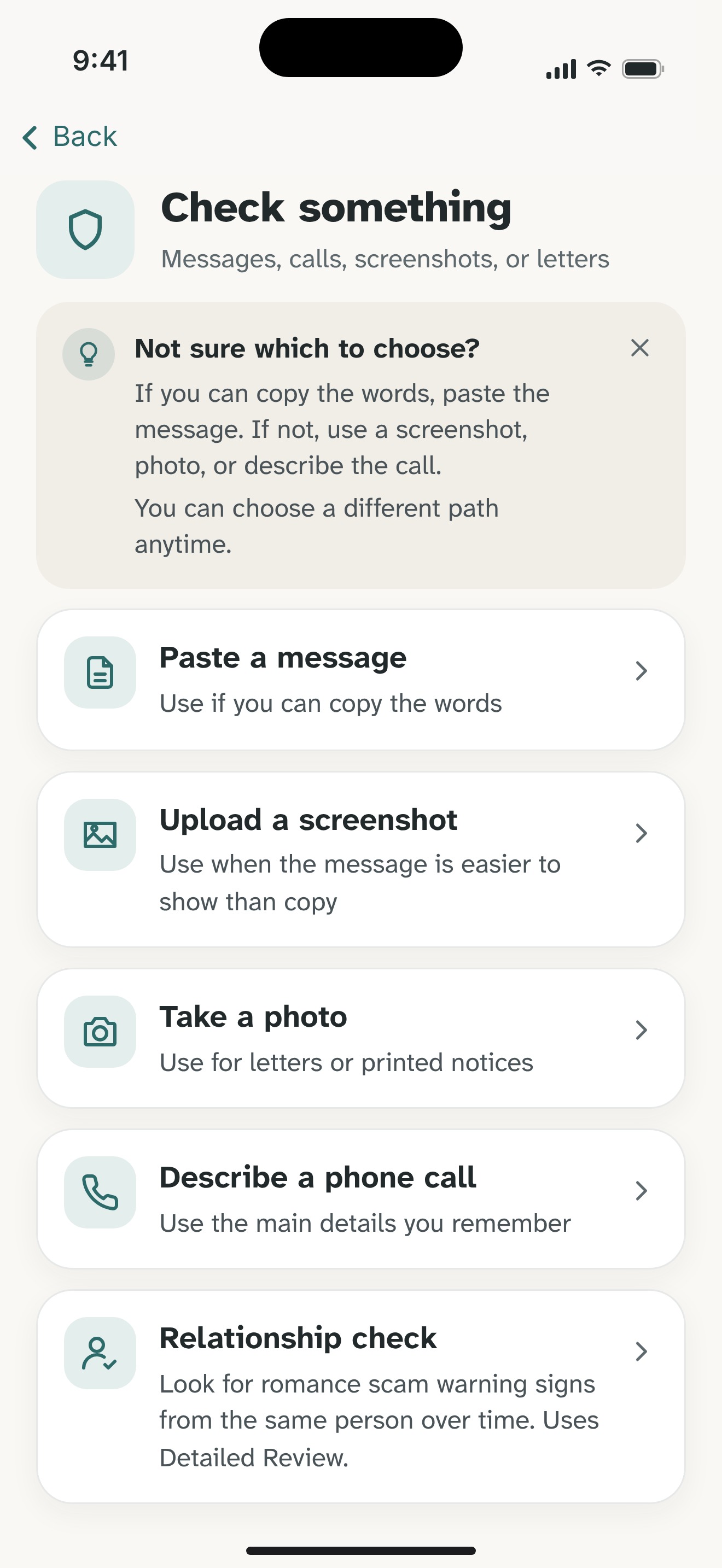

- Keep the request; remove private details. Copy visible wording or describe the call. Remove full codes, passwords, login links, identity details, and payment information.
- Choose a review. Supported pasted text and described calls can use an on-device Private Check. Screenshots and photos use Detailed Review, which sends chosen content to Olevo's backend and OpenAI after consent.
- Read the reasons and check independently. Use the suggested checks with the actual provider. Olevo reviews what you provide; it cannot authenticate the sender, open links, or access your accounts.

Start with 7 free Detailed Reviews on iPhone. Optional Premium. You can follow this guide without the app.