

Review path
Private Check
Best fit
Supported pasted text and described calls
Privacy note
Runs on device for supported checks
Available now on the App Store
Olevo uses AI-supported Detailed Reviews to look more closely at the message, image, or call details you choose to send, with clear reasons and next steps.
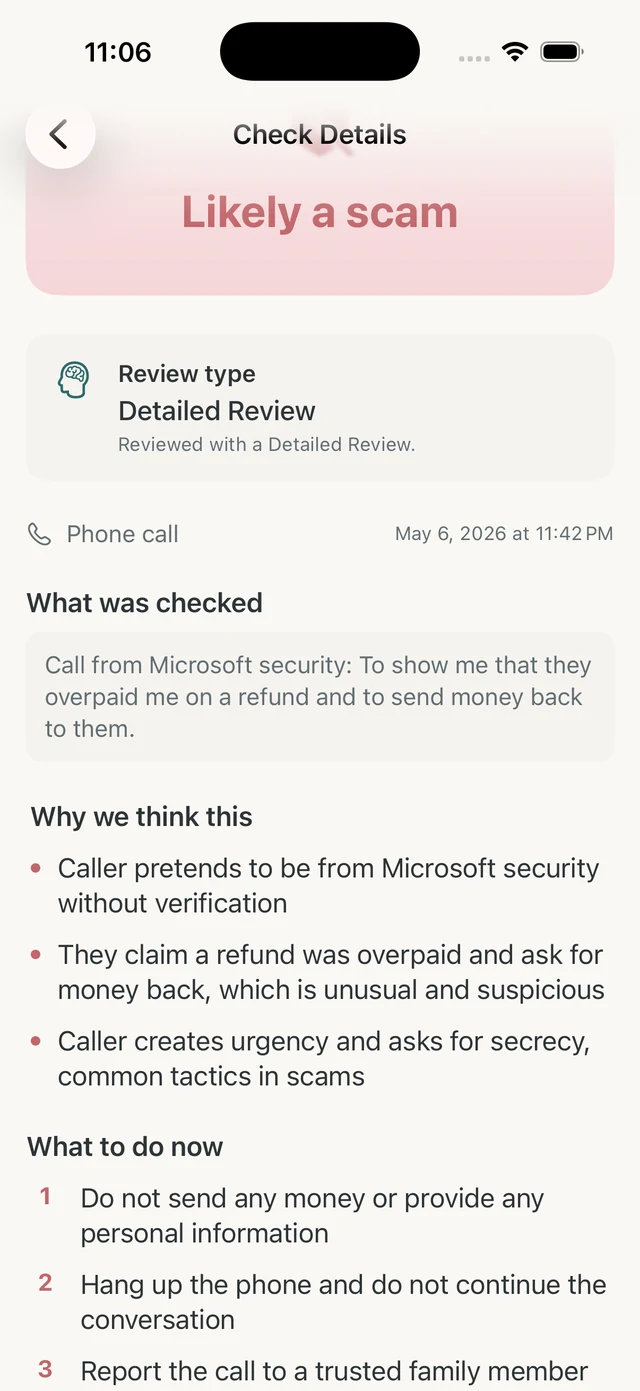
Olevo uses AI-supported review when you choose a Detailed Review for suspicious messages, screenshots, photos, or call details.
The review is designed to explain patterns, pressure, sensitive requests, and safer next steps. It does not promise certainty or replace official verification.
How it helps
A Detailed Review can look at pasted or typed text, call details, screenshots, or photos after you choose what to send. The result shows a verdict, short reasons, and what to do next.
If the review uses an image, Olevo may also show text it found in the image. The app is for warning-sign review, not legal, financial, or law-enforcement decisions.
Private Checks for supported text and described calls stay on device. Detailed Review sends only the content you choose for review, and Olevo asks before the first Detailed Review.
For Relationship checks, the new item and earlier saved text for the selected person are sent to OpenAI. Image history keeps extracted text, not original images. Deleting saved checks removes their evidence from future reviews. Relationship checks require saved history, internet, and one Detailed Review per new item; they do not fall back to Private Check.
That choice matters because suspicious situations can include personal details. Review what is visible before submitting, and remove secrets when the exact value is not needed to understand the request.
Treat the result as a second opinion, not a final authority. Look for the reasons, the sensitive information involved, and the recommended verification path.
When the situation involves a bank, platform, agency, employer, family contact, or payment request, use the result to slow down and then verify through a channel you already trusted before the message arrived.
The two review paths fit different moments. Choose the path that matches the format and sensitivity of what you are checking.
Review path
Best fit
Supported pasted text and described calls
Privacy note
Runs on device for supported checks
Review path
Best fit
Screenshots, photos, longer context, and closer review needs
Privacy note
Sends only the content you choose after consent
Review path
Best fit
Money, accounts, identity, or emergency requests
Privacy note
Use the official app, website, card, bill, or saved contact
Review path
Best fit
Family, voice, or emotionally pressured situations
Privacy note
Ask someone outside the urgent conversation
Do not submit secrets such as actual passwords, full verification codes, or full identity numbers.
The message includes a sender name, a link preview, and language that is hard to copy accurately.
Use Detailed Review only with the screenshot details you are comfortable sending.
The caller mixed account warnings, urgency, and a request to move money or share access.
Type the call details and use the result to decide which official channel to contact.
The wording looks familiar but asks for a code, password, payment, or identity detail.
Review the request, then verify directly through the real app or site.
No. Olevo can help point out warning signs, but no tool can confirm everything is safe. Verify through official channels when money or accounts are involved.
When you continue with Detailed Review, Olevo sends only the content you choose for review and returns a result with warning signs, reasons, and next steps.
Olevo can review the described call details, but a familiar-sounding voice should still be verified through another trusted contact.
Do not paste actual passwords, full codes, or full identity numbers. Remove private details or describe the request instead.
No. Olevo reviews the content you provide. It cannot prove the true sender, caller, or destination behind a link.